사전 준비
EKS 구성 + svc가 동작중 이여야 합니다
EKS 참고 링크
https://box8741.tistory.com/38#%EC%8B%A4%EC%8A%B5%20-%20EKS-1-7
Subnet(PUB)에 Tag 설정
awscli 방법
aws ec2 create-tags \
  --resources subnet-0e39b2043ad66619a subnet-071965700e6b84141 \
  --tags Key=kubernetes.io/role/elb,Value=1 \
         Key=kubernetes.io/role/internal-elb,Value=1 \
         Key=kubernetes.io/cluster/min-cluster,Value=shared

cluster의 IAM OIDC 자격 증명 공급자 생성
eksctl utils associate-iam-oidc-provider --cluster min-cluster --region ap-northeast-2 --approve
IAM 정책 생성
# IAM 정책 다운로드 - AWS Load Balancer Controller가 AWS API 호출을 허용하는 정책
curl -o iam_policy.json https://raw.githubusercontent.com/kubernetes-sigs/aws-load-balancer-controller/v2.3.1/docs/install/iam_policy.json

# 부하분산 관련 정책 생성
aws iam create-policy \
    --policy-name AWSLoadBalancerControllerIAMPolicy \
    --policy-document file://iam_policy.json
aws-load-balancer-controller 라는 k8s service 계정에 대한 IAM 역할 생성
eksctl create iamserviceaccount \
  --region=ap-northeast-2 \
  --cluster=min-cluster \
  --namespace=kube-system \
  --name=aws-load-balancer-controller \
  --attach-policy-arn=arn:aws:iam::799581472868:policy/AWSLoadBalancerControllerIAMPolicy \
  --override-existing-serviceaccounts \
  --approve
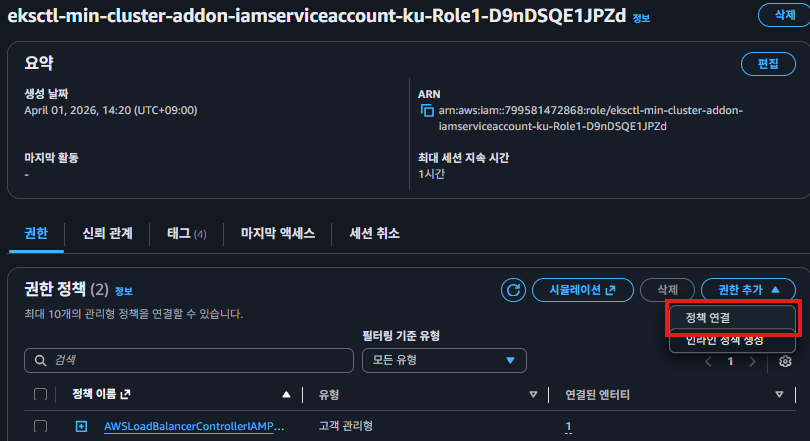
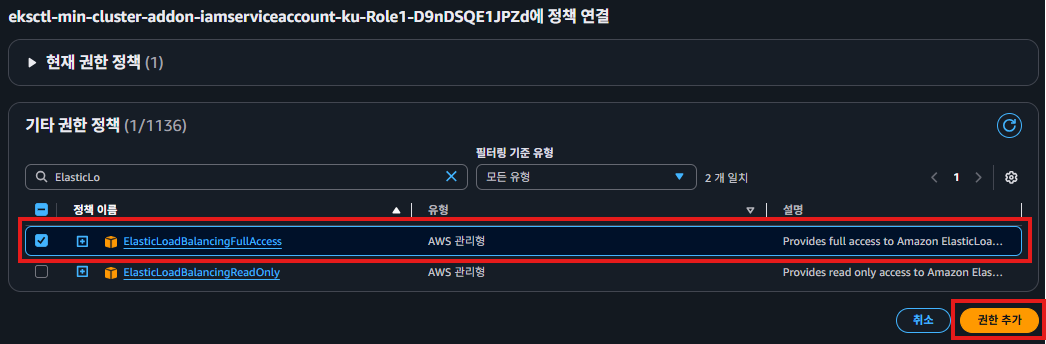
역할에 `ElasticLoadBalancingFullAccess` 권한 추가
AWS Load Balancer Controller 설치를 위해 Helm과 저장소 추가
curl -fsSL -o get_helm.sh https://raw.githubusercontent.com/helm/helm/main/scripts/get-helm-3
chmod +x get_helm.sh
./get_helm

helm repo add eks https://aws.github.io/eks-charts
helm repo update
AWS Load Balancer Controller 설치
 helm install aws-load-balancer-controller eks/aws-load-balancer-controller \
   -n kube-system \
   --set clusterName=min-cluster \
   --set serviceAccount.create=false \
   --set serviceAccount.name=aws-load-balancer-controller \
   --set image.repository=602401143452.dkr.ecr.ap-northeast-2.amazonaws.com/amazon/aws-load-balancer-controller \
   --set region=ap-northeast-2 \
   --set vpcId=vpc-0b4d781f8ccbee1d0
# 설치 확인
kubectl get deploy -n kube-system aws-load-balancer-controller
NLB 로드밸런서 nginx-01.yaml
apiVersion: apps/v1
kind: Deployment
metadata:
  name: nginx-deploy
spec:
  replicas: 2
  selector:
    matchLabels:
      app: nginx
  template:
    metadata:
      labels:
        app: nginx
    spec:
      containers:
        - name: nginx
          image: docker.io/box8741/min-nginx:v1.0
          ports:
          - containerPort: 80
---
apiVersion: v1
kind: Service
metadata:
  name: nginx-svc
  annotations:
    service.beta.kubernetes.io/aws-load-balancer-scheme: internet-facing
spec:
  type: LoadBalancer
  selector:
    app: nginx
  ports:
  - port: 80
    targetPort: 80
# nginx-01.ymal 적용
kubectl apply -f nginx-01.yaml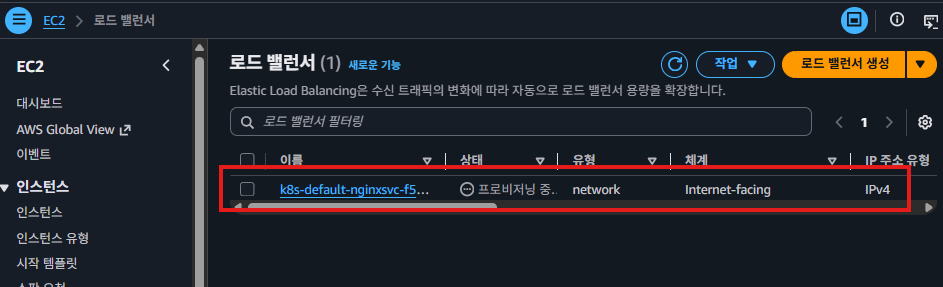
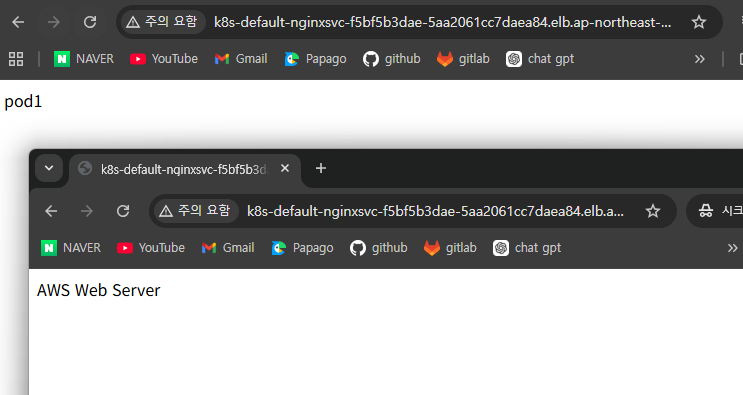
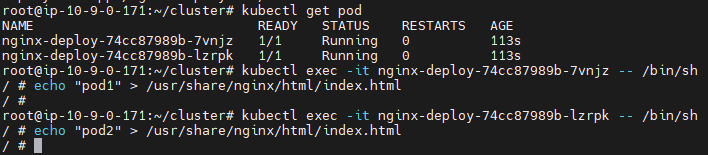
로드밸런싱이 제대로 됐는지 확인을 위해 특정 pod에 직접 접속해 index.html 내용을 변경
같은 사이트인데 다른 내용이 나오는걸 확인 할 수 있다 (NLB 방식)

ALB 로드밸런서 nginx-02.yaml
apiVersion: apps/v1
kind: Deployment
metadata:
  name: nginx-deploy
spec:
  replicas: 2
  selector:
    matchLabels:
      app: nginx
  template:
    metadata:
      labels:
        app: nginx
    spec:
      containers:
        - name: nginx
          image: docker.io/box8741/min-nginx:v1.0
          ports:
          - containerPort: 80
---
apiVersion: v1
kind: Service
metadata:
  name: nginx-svc
spec:
  type: ClusterIP
  selector:
    app: nginx
  ports:
  - port: 80
    targetPort: 80
---
apiVersion: networking.k8s.io/v1
kind: Ingress
metadata:
  name: nginx-alb
  annotations:
    kubernetes.io/ingress.class: alb
    alb.ingress.kubernetes.io/scheme: internet-facing
    alb.ingress.kubernetes.io/target-type: ip
spec:
  ingressClassName: alb
  defaultBackend:
    service:
      name: nginx-svc
      port:
        number: 80
  rules:
  - http:
      paths:
      - path: /
        pathType: Prefix
        backend:
          service:
            name: nginx-svc
            port:
              number: 80
로드밸런싱이 제대로 됐는지 확인을 위해 특정 pod에 직접 접속해 index.html 내용을 변경
같은 사이트인데 새로고침 할때마다 다른 내용이 나오는걸 확인 할 수 있다 (ALB 방식)

'Public Cloud > AWS' 카테고리의 다른 글
| AWS Service - ELB (0) | 2026.04.02 |
|---|---|
| AWS Service - Route53 (0) | 2026.04.02 |
| AWS Service - VPC Peering (0) | 2026.04.02 |
| AWS (0) | 2026.04.02 |
| AWS Service - ECR ECS EKS (0) | 2026.04.01 |